
Guides / Hotkeys
Bind a hotkey
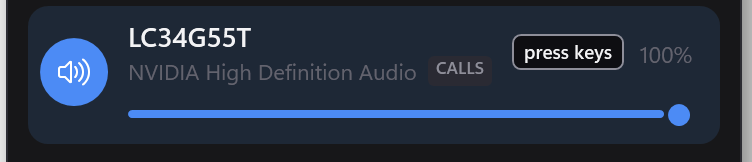
Click the pencil at the top of the flyout, click the keycap on the device or profile, then press the combination you want. It works from anywhere, including inside a fullscreen game.
There's no settings screen — the binding lives on the thing it presses
Switchboard has no options dialog, so there's nowhere to hide a list of keyboard shortcuts. Instead, a hotkey is set on the control it's a shortcut for: the jack for the device, the profile's own button for the profile. The pencil shows every keycap at once.
- Open the flyout and click the pencil in the top corner.
- Click the keycap under the device, or next to the profile.
- Press your combination. It's saved immediately. The tick closes edit mode.
What ships already bound
- Ctrl+Alt+S — open the command palette
- Ctrl+Alt+→ — switch to the next output
- Ctrl+Alt+M — mute or unmute your output
- Ctrl+Alt+K — mute or unmute your microphone
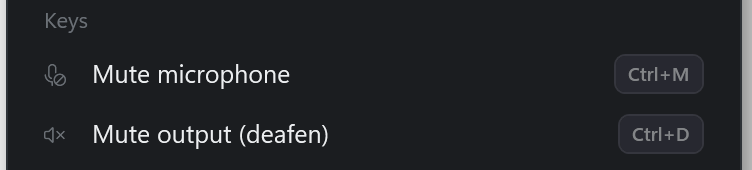
Both mute keys are in edit mode, under Keys. Mute output (deafen) mutes whatever you're listening to; Mute microphone mutes your mic. Click either and press a new combination, or press Delete to remove it. Each acts on whichever device is live, so it keeps working when you switch.
The palette and next-output keys don't have a keycap yet; to change them, edit
%APPDATA%\Switchboard\hotkeys.json. A removed binding stays removed — it
doesn't come back on the next launch.
Seeing that your mic is muted
Muting the microphone with Ctrl+Alt+K — or anywhere else Windows knows about — puts a small "… is muted" pill at the top of the screen, and it stays there until you unmute. The pop-up a hotkey shows is gone in a second; this is for the five minutes later when you start talking.
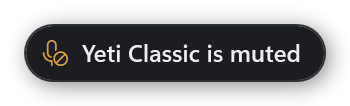
It can only show a mute Windows is told about. Some microphones — the Blue Yeti's own mute button is one — cut the sound inside the device and tell nobody, and no software can see that.
A combination needs a modifier
You can't bind a bare letter. A global hotkey takes that key away from every other program on your PC, so P on its own would break typing everywhere. Use Ctrl, Alt, Shift or Win with it. The one exception is F13–F24, which nothing else uses — handy if your keyboard software can send them.
If the badge looks faded
That means Windows refused the combination, which almost always means another program already owns it. Nothing is broken; the key just belongs to something else. Pick a different one, or close whatever has claimed it.
Switchboard shows this rather than hiding it, because the alternative is a shortcut that silently does nothing and no way to find out why.
How you know it worked
A hotkey is pressed with the flyout shut, usually over a game, so there's nothing on screen to confirm it. A small pill appears near your tray naming what changed, then fades.
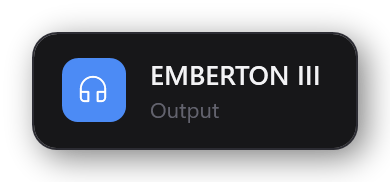
If a switch doesn't take — which Windows very occasionally refuses — the pill says so instead of naming the device.
Where they're stored
%APPDATA%\Switchboard\hotkeys.json. Editing it by hand is supported.